本源码包含多传感器源码,一次一个传感器固件
烧录注意事项:(针脚:3V3/IO1/GND)
日常刷机只需要
firmware.bin一个;另外两个是“打底”的,一般只在首次/换分区表时才刷。串口 OTA 只传firmware.bin,不用管另外两个。(1)build后,三个 bin 各是什么、刷到哪
文件 大小 烧录地址 作用 什么时候需要刷 bootloader.bin15KB 0x0 上电引导程序 几乎不用重刷(除非换芯片/改引导配置) partitions.bin3KB 0x8000 分区表 改了 partitions_sensor.csv才需要firmware.bin275KB 0x20000 (ota_0) 你的程序本体 每次改代码都要刷
(2)串口打印
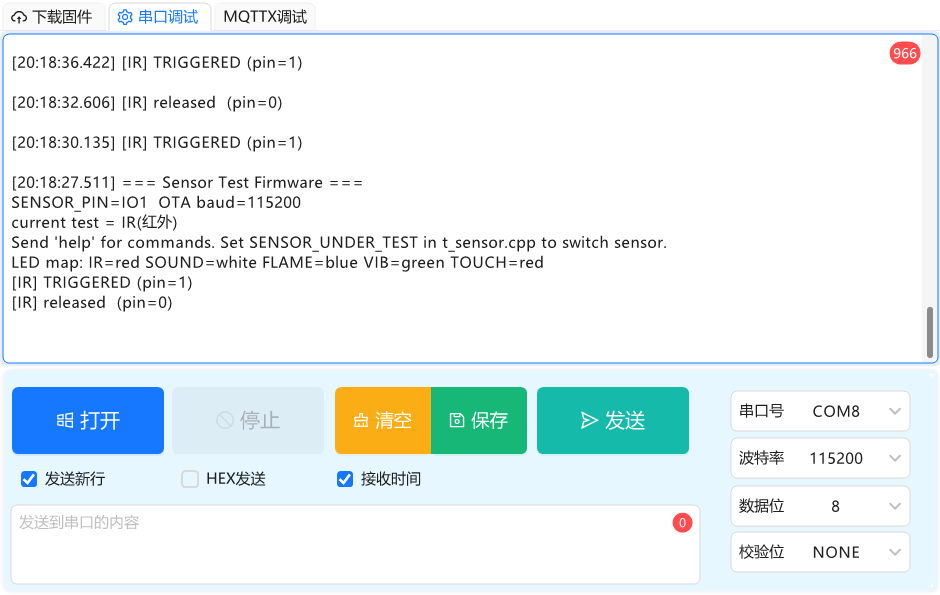
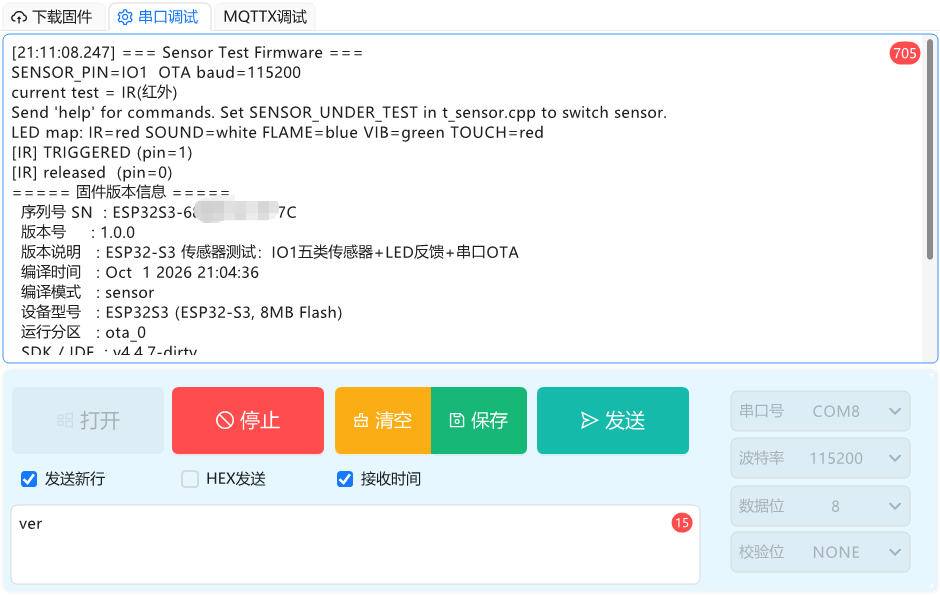
(2)固件源码(默认生成IR人体红外传感器)
烧录时可修改宏定义
#ifndef SENSOR_UNDER_TEST
#define SENSOR_UNDER_TEST SENSOR_IR // 更换固件就换这个(只在IO1测试时)
#endif

#if SENSOR_UNDER_TEST == SENSOR_IR
#define CUR_SENSOR "IR(红外)"
#elif SENSOR_UNDER_TEST == SENSOR_SOUND
#define CUR_SENSOR "SOUND(声音)"
#elif SENSOR_UNDER_TEST == SENSOR_FLAME
#define CUR_SENSOR "FLAME(火焰)"
#elif SENSOR_UNDER_TEST == SENSOR_VIB
#define CUR_SENSOR "VIB(震动)"
#elif SENSOR_UNDER_TEST == SENSOR_TOUCH
#define CUR_SENSOR "TOUCH(触摸)"
#else
#error "SENSOR_UNDER_TEST 未识别,请使用 SENSOR_IR/SOUND/FLAME/VIB/TOUCH"
#endif
/*
* t_sensor.cpp — 传感器专用测试固件(无摄像头 / 无 LCD)
 *
* 烧录: platformio run -e sensor -t upload
 *
* 功能:
*   1) IO1 接各类数字传感器,用板载 WS2812(IO48) 指示灯实时反馈触发/释放;
*   2) 串口打印每次状态翻转(触发 / 释放)便于现场核对;
*   3) 内置「原生串口 OTA」升级:发 serialota 进入接收态,配套 tools/serial_ota.py
*      通过同一串口把 .bin 分帧 + CRC 流式写入【备用 OTA 槽】并重启。
 *
* 设计要点(与项目既有约定一致):
*   · IO1 = GPIO1:全板唯一空闲 GPIO(J2 排针引出),原生 USB CDC(COM8) 不占用它;
*   · 板载 WS2812 单像素,复用核心 neopixelWrite(红灯/绿灯/蓝灯/白灯);
*   · 各传感器为【独立方法】在 loop 中调用,一次只测一个:改顶部 SENSOR_UNDER_TEST
*     宏重新烧录即可(也可把其它 testXxx() 直接注释掉);
*   · 触发电平每类传感器可配(ACTIVE_LEVEL 宏),模块不同可能相反,实测不符就取反;
*   · LED 反馈映射(按需求):红外=红  震动=绿  火焰=蓝  声音=白  触摸=红。
 *
* 串口命令: help / ver / sn / info / led red|green|blue|white|off
*           restart / bootloader / serialota
 */
#include <Arduino.h>
// 本固件的编译模式标识(覆盖 firmware_version.h 默认的 voice_sr)
#define FW_MODE_OVERRIDE "sensor"
#include "pins.h"
#include "esp_ota_ops.h"
#include "esp_partition.h"
#include "Update.h"
#include "firmware_version.h"
#include "bootloader_enter.h"

// ====================== 传感器选择(一次只测一个)======================
#define SENSOR_IR 1
#define SENSOR_SOUND 2
#define SENSOR_FLAME 3
#define SENSOR_VIB 4
#define SENSOR_TOUCH 5

#ifndef SENSOR_UNDER_TEST
#define SENSOR_UNDER_TEST SENSOR_IR // 更换固件就换这个(只在IO1测试时)
#endif

#if SENSOR_UNDER_TEST == SENSOR_IR
#define CUR_SENSOR "IR(红外)"
#elif SENSOR_UNDER_TEST == SENSOR_SOUND
#define CUR_SENSOR "SOUND(声音)"
#elif SENSOR_UNDER_TEST == SENSOR_FLAME
#define CUR_SENSOR "FLAME(火焰)"
#elif SENSOR_UNDER_TEST == SENSOR_VIB
#define CUR_SENSOR "VIB(震动)"
#elif SENSOR_UNDER_TEST == SENSOR_TOUCH
#define CUR_SENSOR "TOUCH(触摸)"
#else
#error "SENSOR_UNDER_TEST 未识别,请使用 SENSOR_IR/SOUND/FLAME/VIB/TOUCH"
#endif

// ====================== 硬件引脚与电平 ======================
#define SENSOR_PIN 1 // IO1:全板唯一空闲 GPIO

// 各传感器触发电平(模块差异可能相反,实测灯反向就把对应宏改一下):
//   LOW  = 触发时引脚被拉低;HIGH = 触发时引脚被拉高
#define IR_ACTIVE_LEVEL HIGH    // 微型人体红外 PIR:触发后输出 3V 高电平(按规格书)
#define SOUND_ACTIVE_LEVEL HIGH // 声音(LM393 比较器常见 OUT 高有效)
#define FLAME_ACTIVE_LEVEL LOW  // 火焰(IR 火焰探头常见 OUT 低有效)
#define VIB_ACTIVE_LEVEL HIGH   // 震动(SW-420 常见 震动时 OUT 高)
#define TOUCH_ACTIVE_LEVEL HIGH // 触摸(TTP223 触摸时 OUT 高)

// ====================== 串口 OTA 参数 ======================
#define OTA_BAUDRATE 115200
#define OTA_CHUNK 1024
#define OTA_HEADER_SIZE 16
#define OTA_FRAME_TIMEOUT 8000 // 每帧/头等待上限(ms),超时即放弃
#define OTA_ACK 0x06
#define OTA_NAK 0x15
// 头布局:4B "SOF1" + uint32 LE total + uint32 LE file_crc32 + uint32 LE flags(保留=0)

// ====================== 诊断(pull / raw 命令)======================
static int g_pullMode = INPUT;     // 当前引脚模式(INPUT/INPUT_PULLUP/INPUT_PULLDOWN)
static bool g_rawPrint = false;    // raw 命令:周期打印引脚原始电平
static uint8_t g_rawLastLevel = 0xFF; // raw 模式里上次电平,0xFF=未初始化

static void applyPinMode()
{
  pinMode(SENSOR_PIN, g_pullMode);
}

// ====================== LED 反馈(板载 WS2812 单像素)======================
static void setLed(uint8_t r, uint8_t g, uint8_t b)
{
  neopixelWrite(PIN_WS2812, r, g, b);
  delayMicroseconds(80); // WS2812 帧后 LOW>50us 才锁存,补余量确保可靠
}
static void ledOff() { setLed(0, 0, 0); }
static void ledRed() { setLed(255, 0, 0); }
static void ledGreen() { setLed(0, 255, 0); }
static void ledBlue() { setLed(0, 0, 255); }
static void ledWhite() { setLed(255, 255, 255); }

// ====================== CRC(与 PC 端 serial_ota.py 严格一致)======================
static uint32_t crc32Step(uint32_t crc, const uint8_t *data, size_t len)
{
  for (size_t i = 0; i < len; i++)
  {
    crc ^= data[i];
    for (int k = 0; k < 8; k++)
      crc = (crc >> 1) ^ (0xEDB88320UL & -(int32_t)(crc & 1));
  }
  return crc;
}
static uint16_t crc16Step(uint16_t crc, const uint8_t *data, size_t len)
{
  for (size_t i = 0; i < len; i++)
  {
    crc ^= data[i];
    for (int k = 0; k < 8; k++)
      crc = (crc >> 1) ^ (0xA001 & -(int16_t)(crc & 1));
  }
  return crc;
}

// ====================== 通用数字传感器轮询(带去抖/保持)======================
// 部分模块(微型 PIR 等)无人时会“触发→保持2s→封锁2s→再触发”自激振荡,仅靠边沿判断会狂刷。
// 这里要求新电平持续 >= debounceMs 才算数,从而滤掉短促自激、保留真实持续触发。
struct SensorState
{
  bool last;        // 已提交(已点灯/已打印)的状态
  bool pending;     // 当前候选电平
  uint32_t sinceMs; // pending 起始时刻
  bool init;
};

static void pollSensor(const char *name, int activeLevel,
                       void (*onLed)(void), void (*offLed)(void),
                       SensorState &st, uint32_t debounceMs)
{
  int v = digitalRead(SENSOR_PIN);
  bool raw = (v == activeLevel);
  if (!st.init) // 上电首帧:按当前电平设灯,不打印(避免误报)
  {
    st.last = raw;
    st.pending = raw;
    st.sinceMs = millis();
    st.init = true;
    if (raw)
      onLed();
    else
      offLed();
    return;
  }
  if (raw != st.pending)
  {
    st.pending = raw;
    st.sinceMs = millis();
  }
  if (raw != st.last && (millis() - st.sinceMs) >= debounceMs)
  {
    st.last = raw;
    if (raw)
    {
      onLed();
      Serial.printf("[%s] TRIGGERED (pin=%d)\n", name, v);
    }
    else
    {
      offLed();
      Serial.printf("[%s] released  (pin=%d)\n", name, v);
    }
  }
}

// ---- 五个独立测试方法(一次只跑一个,由 SENSOR_UNDER_TEST 分发)----
// 去抖时长(ms):微型 PIR 自激周期约 4s(2s 触发 + 2s 封锁),IR 设 >2s 可滤掉无人自激、
// 又不影响“人在场连续触发”;其它数字传感器通常无自激,设 0 即时响应。
#define IR_DEBOUNCE_MS    2200
#define SOUND_DEBOUNCE_MS 0
#define FLAME_DEBOUNCE_MS 0
#define VIB_DEBOUNCE_MS   0
#define TOUCH_DEBOUNCE_MS 0

static SensorState g_ir = {false, false, 0, false};
static void testIr()
{
  pollSensor("IR", IR_ACTIVE_LEVEL, ledRed, ledOff, g_ir, IR_DEBOUNCE_MS);
}

static SensorState g_snd = {false, false, 0, false};
static void testSound()
{
  pollSensor("SOUND", SOUND_ACTIVE_LEVEL, ledWhite, ledOff, g_snd, SOUND_DEBOUNCE_MS);
}

static SensorState g_flame = {false, false, 0, false};
static void testFlame()
{
  pollSensor("FLAME", FLAME_ACTIVE_LEVEL, ledBlue, ledOff, g_flame, FLAME_DEBOUNCE_MS);
}

static SensorState g_vib = {false, false, 0, false};
static void testVibration()
{
  pollSensor("VIB", VIB_ACTIVE_LEVEL, ledGreen, ledOff, g_vib, VIB_DEBOUNCE_MS);
}

static SensorState g_touch = {false, false, 0, false};
static void testTouch()
{
  pollSensor("TOUCH", TOUCH_ACTIVE_LEVEL, ledRed, ledOff, g_touch, TOUCH_DEBOUNCE_MS);
}

static void runSensorTest()
{
#if SENSOR_UNDER_TEST == SENSOR_IR
  testIr();
#elif SENSOR_UNDER_TEST == SENSOR_SOUND
  testSound();
#elif SENSOR_UNDER_TEST == SENSOR_FLAME
  testFlame();
#elif SENSOR_UNDER_TEST == SENSOR_VIB
  testVibration();
#elif SENSOR_UNDER_TEST == SENSOR_TOUCH
  testTouch();
#endif
}

// ====================== 串口 OTA(原生,接收态)======================
enum OtaState
{
  OTA_IDLE = 0,
  OTA_WAIT_HEADER,
  OTA_RECV_DATA,
  OTA_DONE
};
static OtaState g_otaState = OTA_IDLE;
static bool g_serialOta = false;
static uint32_t g_otaTotal = 0;       // 期望总字节
static uint32_t g_otaRecv = 0;        // 已收字节
static uint32_t g_otaCalcCrc = 0;     // 运行 CRC32(seed=0xFFFFFFFF)
static uint32_t g_otaExpectedCrc = 0; // 头里带的文件 CRC32
static unsigned long g_otaLastMs = 0;

// 严格按超时从串口读满 len 字节(避免 readBytes 半截返回导致误判)
static int readExact(uint8_t *buf, int len, unsigned long timeoutMs)
{
  unsigned long t0 = millis();
  int got = 0;
  while (got < len)
  {
    if (Serial.available())
      buf[got++] = (uint8_t)Serial.read();
    else if (millis() - t0 > timeoutMs)
      break;
    else
      delay(1);
  }
  return got;
}

static void serialOtaAbort()
{
  Update.end(false);
  g_serialOta = false;
  g_otaState = OTA_IDLE;
  ledRed();
  delay(200);
  ledOff();
  Serial.println("[OTA] aborted, back to sensor test");
}

static void serialOtaEnter()
{
  g_serialOta = true;
  g_otaState = OTA_WAIT_HEADER;
  g_otaTotal = g_otaRecv = 0;
  g_otaCalcCrc = 0xFFFFFFFF;
  g_otaExpectedCrc = 0;
  g_otaLastMs = millis();
  Serial.println("[OTA] entering serial receive mode");
  Serial.println("SOF_READY"); // PC 端以此判断设备就绪
  Serial.flush();
}

// 每 loop 迭代调用一次;进入接收态后普通串口命令解析暂停。返回 true 表示仍在 OTA 态。
static void serialOtaTask()
{
  if (g_otaState == OTA_WAIT_HEADER)
  {
    uint8_t hdr[OTA_HEADER_SIZE];
    if (readExact(hdr, OTA_HEADER_SIZE, OTA_FRAME_TIMEOUT) != OTA_HEADER_SIZE)
    {
      if (millis() - g_otaLastMs > OTA_FRAME_TIMEOUT)
      {
        Serial.println("[OTA] timeout waiting header");
        serialOtaAbort();
      }
      return;
    }
    if (memcmp(hdr, "SOF1", 4) != 0)
    {
      Serial.println("[OTA] bad magic");
      serialOtaAbort();
      return;
    }
    g_otaTotal = (uint32_t)hdr[4] | ((uint32_t)hdr[5] << 8) |
                 ((uint32_t)hdr[6] << 16) | ((uint32_t)hdr[7] << 24);
    g_otaExpectedCrc = (uint32_t)hdr[8] | ((uint32_t)hdr[9] << 8) |
                       ((uint32_t)hdr[10] << 16) | ((uint32_t)hdr[11] << 24);
    // hdr[12..15] = flags(保留)
    if (!Update.begin(g_otaTotal, U_FLASH))
    {
      Serial.printf("[OTA] Update.begin fail: %s\n", Update.errorString());
      Serial.write(OTA_NAK);
      serialOtaAbort();
      return;
    }
    g_otaRecv = 0;
    g_otaCalcCrc = 0xFFFFFFFF;
    g_otaState = OTA_RECV_DATA;
    g_otaLastMs = millis();
    Serial.printf("[OTA] header ok, total=%u bytes\n", g_otaTotal);
    Serial.write(OTA_ACK);
    Serial.flush();
    return;
  }

  if (g_otaState == OTA_RECV_DATA)
  {
    uint8_t lenb[2];
    if (readExact(lenb, 2, OTA_FRAME_TIMEOUT) != 2)
    {
      if (millis() - g_otaLastMs > OTA_FRAME_TIMEOUT)
      {
        Serial.println("[OTA] timeout waiting frame len");
        serialOtaAbort();
      }
      return;
    }
    uint16_t flen = (uint16_t)(lenb[0] | (lenb[1] << 8));
    if (flen == 0)
    {
      // 结束帧:再读 2 字节尾巴(忽略),进入校验
      uint8_t tail[2];
      readExact(tail, 2, 1000);
      g_otaState = OTA_DONE;
      return;
    }
    uint8_t *buf = (uint8_t *)malloc(flen);
    if (!buf)
    {
      Serial.write(OTA_NAK);
      return;
    }
    if (readExact(buf, flen, OTA_FRAME_TIMEOUT) != flen)
    {
      free(buf);
      if (millis() - g_otaLastMs > OTA_FRAME_TIMEOUT)
      {
        Serial.println("[OTA] timeout frame data");
        serialOtaAbort();
      }
      else
        Serial.write(OTA_NAK);
      return;
    }
    uint8_t cb[2];
    if (readExact(cb, 2, OTA_FRAME_TIMEOUT) != 2)
    {
      free(buf);
      if (millis() - g_otaLastMs > OTA_FRAME_TIMEOUT)
      {
        Serial.println("[OTA] timeout frame crc");
        serialOtaAbort();
      }
      else
        Serial.write(OTA_NAK);
      return;
    }
    uint16_t fcrc = (uint16_t)(cb[0] | (cb[1] << 8));
    if (crc16Step(0xFFFF, buf, flen) != fcrc)
    {
      free(buf);
      Serial.write(OTA_NAK); // PC 端会重传同一帧
      return;
    }
    size_t w = Update.write(buf, flen);
    free(buf);
    if (w != flen)
    {
      Serial.println("[OTA] write flash fail");
      serialOtaAbort();
      return;
    }
    g_otaCalcCrc = crc32Step(g_otaCalcCrc, buf, flen);
    g_otaRecv += flen;
    g_otaLastMs = millis();
    Serial.write(OTA_ACK);
    uint32_t pct = g_otaTotal ? g_otaRecv * 100 / g_otaTotal : 100;
    static uint32_t lastPct = 0;
    if (pct / 10 != lastPct / 10)
    {
      lastPct = pct / 10;
      Serial.printf("[OTA] %u%%\n", pct);
    }
    return;
  }

  if (g_otaState == OTA_DONE)
  {
    Serial.printf("[OTA] recv %u/%u bytes, verify...\n", g_otaRecv, g_otaTotal);
    if (g_otaRecv != g_otaTotal)
    {
      Serial.println("[OTA] length mismatch");
      serialOtaAbort();
      return;
    }
    uint32_t finalCrc = ~g_otaCalcCrc;
    if (finalCrc != g_otaExpectedCrc)
    {
      Serial.printf("[OTA] crc32 mismatch got=%08x expect=%08x\n", finalCrc, g_otaExpectedCrc);
      serialOtaAbort();
      return;
    }
    if (!Update.end(true)) // 校验镜像 + 设启动分区
    {
      Serial.printf("[OTA] verify fail: %s\n", Update.errorString());
      serialOtaAbort();
      return;
    }
    // 兜底:显式把启动分区指向刚写入的槽
    const esp_partition_t *running = esp_ota_get_running_partition();
    const esp_partition_t *next = esp_ota_get_next_update_partition(running);
    if (next)
      esp_ota_set_boot_partition(next);
    Serial.println("[OTA] OK, rebooting into new firmware");
    ledGreen();
    delay(200);
    Serial.flush();
    ESP.restart();
    return;
  }
}

// ====================== 串口命令 ======================
static void printHelp()
{
  Serial.println("===== Sensor Test 串口命令 =====");
  Serial.println(" help                显示本帮助");
  Serial.println(" ver / version       打印固件版本/编译时间/SN/运行分区");
  Serial.println(" sn                  打印设备序列号 SN");
  Serial.println(" info                打印当前测试传感器与 LED 映射");
  Serial.println(" led red|green|blue|white|off  手动点灯自检");
  Serial.println(" restart / reboot    软重启");
  Serial.println(" bootloader          免按 BOOT 键进入 ROM 下载模式(esptool)");
  Serial.println(" serialota           进入原生串口 OTA 接收态(配合 tools/serial_ota.py)");
  Serial.println(" pull none|up|down   实时切引脚上/下拉(诊断悬空/开漏输出)");
  Serial.println(" raw                 开/关 原始电平打印(500ms一次)");
  Serial.println("----- 当前配置 -----");
  Serial.printf(" SENSOR_PIN = IO%d\n", SENSOR_PIN);
  Serial.printf(" 当前测试   = %s\n", CUR_SENSOR);
  Serial.println(" LED 映射: 红外=红  震动=绿  火焰=蓝  声音=白  触摸=红");
  Serial.println(" 切换传感器: 改 t_sensor.cpp 顶部 SENSOR_UNDER_TEST 宏后重新烧录");
}

static void printInfo()
{
  Serial.printf("[INFO] SENSOR_PIN=IO%d  current=%s\n", SENSOR_PIN, CUR_SENSOR);
  Serial.println("[INFO] LED: IR=红 SOUND=白 FLAME=蓝 VIB=绿 TOUCH=红");
  Serial.printf("[INFO] active levels: IR=%d SOUND=%d FLAME=%d VIB=%d TOUCH=%d (0=LOW,1=HIGH)\n",
                (int)(IR_ACTIVE_LEVEL == HIGH), (int)(SOUND_ACTIVE_LEVEL == HIGH),
                (int)(FLAME_ACTIVE_LEVEL == HIGH), (int)(VIB_ACTIVE_LEVEL == HIGH),
                (int)(TOUCH_ACTIVE_LEVEL == HIGH));
}

static void handleSerialCmd(const String &s)
{
  String low = s;
  low.toLowerCase();
  if (low == "help" || low == "?")
  {
    printHelp();
  }
  else if (low == "ver" || low == "version")
  {
    printVersionSerial();
  }
  else if (low == "sn")
  {
    Serial.printf("SN=%s\n", getDeviceSN().c_str());
  }
  else if (low == "info")
  {
    printInfo();
  }
  else if (low == "restart" || low == "reboot")
  {
    Serial.println("rebooting...");
    delay(200);
    ESP.restart();
  }
  else if (low == "bootloader")
  {
    Serial.println("[SYS] 即将重启进入 ROM 下载模式(免按 BOOT 键)...");
    Serial.println("[SYS] 之后用 esptool / tools/serial_flash.py 烧录");
    delay(300);
    esp_restart_into_bootloader_compat();
  }
  else if (low == "serialota")
  {
    serialOtaEnter();
  }
  else if (low.startsWith("pull "))
  {
    // 实时切换引脚上/下拉:诊断「开漏输出/悬空漂移」类问题
    String m = low.substring(5);
    m.trim();
    if (m == "none")
      g_pullMode = INPUT;
    else if (m == "up")
      g_pullMode = INPUT_PULLUP;
    else if (m == "down")
      g_pullMode = INPUT_PULLDOWN;
    else
    {
      Serial.println("pull usage: pull none|up|down");
      return;
    }
    applyPinMode();
    Serial.printf("[PIN] IO%d pinMode -> %s\n", SENSOR_PIN,
                  g_pullMode == INPUT ? "INPUT" : g_pullMode == INPUT_PULLUP ? "INPUT_PULLUP"
                                                                             : "INPUT_PULLDOWN");
  }
  else if (low == "raw")
  {
    g_rawPrint = !g_rawPrint;
    g_rawLastLevel = 0xFF;
    Serial.printf("[RAW] %s (每500ms打印一次 IO%d 原始电平)\n",
                  g_rawPrint ? "ON" : "OFF", SENSOR_PIN);
  }
  else if (low.startsWith("led "))
  {
    String c = low.substring(4);
    c.trim();
    if (c == "red")
      ledRed();
    else if (c == "green")
      ledGreen();
    else if (c == "blue")
      ledBlue();
    else if (c == "white")
      ledWhite();
    else if (c == "off")
      ledOff();
    else
    {
      Serial.println("led usage: led red|green|blue|white|off");
      return;
    }
    Serial.printf("[LED] set %s\n", c.c_str());
  }
  else
  {
    Serial.printf("unknown: '%s' (send help)\n", s.c_str());
  }
}

// ====================== setup / loop ======================
void setup()
{
  Serial.begin(OTA_BAUDRATE);
  Serial.setTxTimeoutMs(0);
  delay(1000);
  applyPinMode(); // 数字传感器(模块自带输出/上拉,可用 pull 命令实时改)
  pinMode(PIN_WS2812, OUTPUT);
  ledOff();

  Serial.println("=== Sensor Test Firmware ===");
  Serial.printf("SENSOR_PIN=IO%d  OTA baud=%d\n", SENSOR_PIN, OTA_BAUDRATE);
  Serial.printf("current test = %s\n", CUR_SENSOR);
  Serial.println("Send 'help' for commands. Set SENSOR_UNDER_TEST in t_sensor.cpp to switch sensor.");
  Serial.printf("LED map: IR=red SOUND=white FLAME=blue VIB=green TOUCH=red\n");
}

void loop()
{
  // 串口 OTA 接收态:抢占整个 loop,暂停传感器轮询与命令解析
  if (g_serialOta)
  {
    serialOtaTask();
    return;
  }

  // 串口命令:逐字节累积 + 换行即执行 + 80ms 静默判为一条(兼容带/不带换行两种发送)
  static char rxBuf[64];
  static int rxLen = 0;
  static unsigned long rxLast = 0;
  while (Serial.available() > 0)
  {
    char c = (char)Serial.read();
    rxLast = millis();
    if (c == '\n' || c == '\r')
    {
      if (rxLen > 0)
      {
        rxBuf[rxLen] = 0;
        handleSerialCmd(String(rxBuf));
        rxLen = 0;
      }
    }
    else if (rxLen < (int)sizeof(rxBuf) - 1)
    {
      rxBuf[rxLen++] = c;
    }
  }
  if (rxLen > 0 && (millis() - rxLast) > 80)
  {
    rxBuf[rxLen] = 0;
    handleSerialCmd(String(rxBuf));
    rxLen = 0;
  }

  // raw 诊断:每 500ms 打印一行引脚原始电平(看电平是真跳变还是打印边沿误判)
  if (g_rawPrint)
  {
    static unsigned long lastRawMs = 0;
    unsigned long now = millis();
    if (now - lastRawMs >= 500)
    {
      lastRawMs = now;
      Serial.printf("[%lu.%03lu] raw pin=%d\n", now / 1000, now % 1000,
                    (int)digitalRead(SENSOR_PIN));
    }
  }

  // 一次只测一个传感器
  runSensorTest();
  delay(20);
}